發表文章

目前顯示的是有「小程式」標籤的文章

簡記:Node.js使用google sheet API讀取(新版google-auth&typescript)

 這裡是serviceaccount的json放在環境變數中,並googleapis套件操作google sheet api。 因為新版google auth套件有改版把fromJSON()和給廢掉,導致升級版本程式要調整,跟google&AI弄了弄,範例都給我奇怪的結果,這篇把這些整理起來 pnpm add googleapis import { google , sheets_v4 } from 'googleapis' ; async function main ( ... args : string []) { const credentials = JSON . parse (process. env . SHEET_CREDENTIALS ); const authClient = new google . auth . JWT ({ scopes : [ 'https://www.googleapis.com/auth/spreadsheets' ] }) authClient . fromJSON ( credentials ); const sheetAPIs = google . sheets ({ version : 'v4' , auth : authClient }); const res = await sheetAPIs . spreadsheets . get ({ spreadsheetId : process. env . SHEET_ID }); if ( ! res . ok ) throw Error(`http error code:${ res . status }`); console . log ( res . data ) } const args = process . argv . slice ( 2 ); main ( ... args ). catch ( console . error ); scopes上面是提供讀寫 如果只讀取,就改成 scopes: ['https://www.go...

[Node.js]計算檔案雜湊用來比對Cloud Storage的md5Hash

圖片
由於Cloud Storage返回的Metadata的md5Hash值是BASE64編碼過得資料,如下附圖,要比對是否相同需要生成相同的值。 這篇裡面會分別給予BASH指令和Node.js程式如何作用來比對GCS檔案的md5雜湊值

[Node.js]讀取JPEG相片EXIF資訊中的GPS和時間戳記

圖片
一些網站,如google photo,上傳相片後,會抓取偵測你的相片中的EXIF(Exchangeable image file format),自動得使用時間戳記資訊並歸類到合適的位置。 以前我是使用exiv2指令操作或複製exif資訊 ,這篇整理使用Node.js程式取出EXIF的GPS與時間戳記,時間戳記還會轉換有時區資訊的Date物件。 安裝套件 npm install exif 程式碼 import exif from 'exif' ; const ARGS = process . argv . slice ( 2 ); if ( ARGS . length < 1 ) { console . error ( `given 1 arg, usage: node ${ process . argv [ 1 ] } <input-image-path>` ) process . exit ( 1 ); } // 從第一個參數取的照片檔案路徑 const photoPath = ARGS [ 0 ]; // 從指定路徑取得exif資訊, 這是一個async函數 function readExifFromPathAsync ( image ) { return new Promise (( resolve , reject ) => { new exif . ExifImage ({ image }, ( error , exifData ) => { error ? reject ( error ) : resolve ( exifData ); }) }) } // 將timestamp字串轉換成Date function exifTS2Date ( timestamp , timezone ) { // 時間戳記字串格式是 YYYY:MM:DD HH:MM:SS const regex = / ^ ( \d {4} ) : ( \d {2} ) : ( \d {2} )[ T ]( \d {2} :\d {2} :\d {2} ) $ / ; // ...

小程式:使用GAS影像代理伺服器顯示其他伺服器上的影像

這篇是寫一個簡單網頁, 搭配前一篇: GAS小程式:影像代理伺服器 cowork-with-ai ,就能顯示DataURL的影像

GAS小程式:影像代理伺服器 cowork-with-ai

這個小程式是詢問ChatGPT後得到的idea 只要將這個script發布成網頁應用程式就能代理影像URL 備註:如果來源有透過token,user-agent阻擋存取,則還需要改一下這個小程式 代理影像的使用方式是給予imageUrl參數, 就會回傳該影像的DataURL 該如何使用DataURL會另外發文

小程式:使用wasm版ffmpeg轉換m4a成wav音檔

使用WASM版ffmpeg緣由 這個東西會在Line BOT中使用到,因為不是所有雲服務上都能夠安裝ffmpeg套件,所以這個機制就能,雖然轉換效率不太好,就是一個可運行的方案。 1. 安裝node.js  建議使用node.js 18 LTS版本 2. 安裝套件 npm install @ffmpeg/core@^0.11 @ffmpeg/ffmpeg@^0.11 @ffmpeg/ffmpeg在 0.12之後做了API的改變 ,並且不支援Node.js了 3. 寫程式

SVG圖片的文字置中與垂直置中(React與HTML內嵌SVG)

圖片
就如同下圖所表示的兩個SVG上有水平的字和垂直的字,以下將針對React.js和HTML內嵌SVG的作法。

小程式:用Imgur的Client ID上傳圖檔

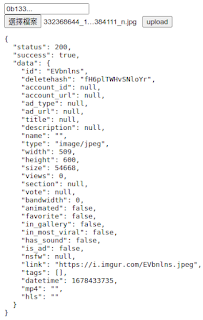
圖片
Imgur可以使用Client ID就上傳圖檔,官方上傳圖片的文件說明在 這裡 ,這裡分享簡易的圖片上傳頁,上傳Imgur後得到的圖片網址就在回應的data.link中。 那該如何取得你的Client ID? 

node.js存取google calendar API


小程式:Form上傳檔案到Node.js的Express伺服器

彙整項目 使用HTML form的2種post方法上傳檔案 使用javascript以put方法上傳檔案 針對表單上傳對應的伺服器端寫法 各種上傳對應的CURL指令(見註解) 上code

測試AppsScript使用的python程式

這裡感謝Taylor提供的幫助 python 3.5.2 版本 程式碼如下: #!/usr/bin/python3 # -*- encoding: utf-8 -*- try:     # for python 3.5.2     import urllib.parse     import urllib.request except AttributeError:     import urllib query_method = 0 test_url = "你的測試URL" param_obj = {     "m":"123456", } if 0 == query_method:     # POST method     form_data = urllib.parse.urlencode(param_obj).encode('utf-8')     req = urllib.request.Request(test_url, form_data)     print('query url:', test_url)     with urllib.request.urlopen(req) as f:         status = f.status         resp = f.read().decode('utf-8') elif 1 == query_method:     # GET method     params = urllib.parse.urlencode(param_obj)     req_url = "%s?%s" % (test_url, params)     print('query url:', req_url)     with urllib.request.urlopen(req...

AppsScript:測試並自我Query的方法

下面填入你的網址就能query了 var test_url = {你的測試網址}; var param_obj = {   'm': 123456, }; function json2urlparams_(json) {      return Object.keys(json).map(         function(key) {              return encodeURIComponent(key) + '=' +                     encodeURIComponent(json[key]);      }).join('&');  } function test_post() {     var resp = UrlFetchApp.fetch(test_url, {       'method' : 'post',       'payload' : json2urlparams_(param_obj)     });     Logger.log('status:', resp.getResponseCode());     Logger.log('response:', resp.getContentText()); } function test_get() {     var url = test_url + '?' + json2urlparams_(param_obj);     var resp = UrlFetchApp.fetch(url);     Logger.log('status:', resp.getResponseCode()); ...

PYTHON小程式:收Multicast/IGMP封包存到檔案

接收Multicast/IGMP封包到檔案 ref: https://pymotw.com/2/socket/multicast.html

長按ImageView開啟選取器取得圖片Uri

加入長按事件     private ImageView imageView; ... onCreate ...         imageView = findViewById(R.id.imageView);         imageView.setOnLongClickListener(new View.OnLongClickListener() {             @Override             public boolean onLongClick(View view) {                 pickFromGallery();                 return true;             }         }); 啟動圖片選取器     /**      * @ref https://androidclarified.com/pick-image-gallery-camera-android/      */     final static int GALLERY_REQUEST_CODE = 0x1000;     private void pickFromGallery() {         Intent intent = new Intent(Intent.ACTION_PICK); // launch gallery app         //Intent intent ...

用CloudWatch定時產生Event丟檔案到S3

圖片
1. 建立S3 Bucket 建立後記得改後面的程式碼的var bucketName變數的值。 2. IAM新增Role  先在IAM新增一個role,連接AWSLambdaExecute政策,這個政策會包含可以在S3放檔案的權限。 3. 新增Lambda函數 選擇"從頭開始撰寫" 函數名稱,看你喜歡,我是設"myLambda" 執行時間,使用"Node.js 12.x" 選擇或建立執行角色,使用已存在角色,選擇步驟1所建立的Role。 放置Lambda程式碼 var AWS = require('aws-sdk'); var bucketName = '{your-bucket-name}'; function putFileToS3(key, body, callback) {     var s3 = new AWS.S3();     s3.putObject({Bucket: bucketName, Body: body, Key: key}, callback); } exports.handler = (event, context, callback) => {     console.log('my lambda');     console.log('Received event:', JSON.stringify(event, null, 2));     putFileToS3(event.id, JSON.stringify(event, null, 2),         (err, response) => {             if (err) {                 console.error(err);                 callback(err); ...

小程式:從列表中移除

來源資料, 只看第一個 1 2 3 2 2 3 3 2 3 4 2 3 要刪除的內容 1 3 結果會得到 2 4 使用方法 process test.txt rmlist.txt result.txt debug原始載入資料 process test.txt rmlist.txt result.txt 1 debug載入資料第一欄 process test.txt rmlist.txt result.txt 2 #include <vector> #include <iostream> #include <string> #include <fstream> #include <algorithm> #include <sstream> using namespace std; int DEBUG = 0; string outpath = "result.txt"; int main(int argc, char** argv) {     cout << argc << endl;     if (argc <= 2) return -1;     cout << "long list:" << argv[1] << endl;     cout << "remove list:" << argv[2] << endl;     if (argc > 3) outpath = argv[3];     cout << "output file:" << outpath << endl;     if (argc > 4) DEBUG = atoi(argv[4]);     ifstream rdf(argv[1], ifstream::in);     ifstream ...

Get the large file size

#define _LARGEFILE64_SOURCE #include <unistd.h> #include <sys/types.h> #include <sys/stat.h> #include <fcntl.h> #include <stdio.h> int main(int argc, char** argv) {     int fd;     off64_t pos;     if (argc <= 1) return -1;     printf("%d %s\n", argc, argv[1]);     fd = open(argv[1], O_RDONLY);     if (-1 == fd) {         printf("open failed\n");         return -1;     }     pos = lseek64(fd, 0, SEEK_END);     printf("size = %ld\n", pos);     close(fd);     return 0; }

Sample code for implementing the reflection interface Raw

Python手寫檔案伺服器延伸內容

應用上一篇的 Python檔案伺服器 ,我們還可以寫一些不同的回應,像是.. 1. 回應Client端要求HTML檔案 def responseHtmlFile(hdl, path):     f = open(path, "rb")     fs = os.fstat(f.fileno())     hdl.send_response(200)     hdl.send_header("Content-type", "text/html; charset=UTF-8")     hdl.send_header("Content-Length", str(fs[6]))     hdl.send_header("Last-Modified", hdl.date_time_string(fs.st_mtime))     hdl.end_headers()     shutil.copyfileobj(f, hdl.wfile)     f.close()     del f 用法: responseHtmlFile(hdl, '/home/user/your_html_file.htm') 2. 回應Client端,要求轉址到另一個目標位置 def responseHttpRedirect(hdl, target):     hdl.send_response(301)     hdl.send_header("Location", target)     hdl.end_headers() 用法: responseHttpRedirect(hdl, 'http://www.google.com') 3. 把Client的request資訊parse後再回應給Client def responseGetRequest(hdl):     parsed = urlparse(hdl.path)     hdl.se...

用Python手寫檔案伺服器

這是一個用Python寫的迷你檔案伺服器, 有在Ubuntu上測試過python2.7和python3.4版都可以使用。 如果要接受所有來源的ThisServerIp請使用0.0.0.0作為Server位址 如果要當作一般的網站ThisServerPort請使用80 要提供下載的檔案請把絕對路徑寫在DownloadFilePath1和DownloadFilePath2上 執行的方法 1. For Windows python.exe MyServer.py 2. For Ubuntu python MyServer.py 測試用URL http://127.0.0.1:8080/GetFileInfo http://127.0.0.1:8080/GetFileInfo?name=file1 http://127.0.0.1:8080/GetFileInfo?name=file2 http://127.0.0.1:8080/DownloadFile1 http://127.0.0.1:8080/DownloadFile2 GetFileInfo沒有指定參數name的時候會回應json格式的資訊 DownloadFile1, DownloadFile2是直接下載script指定的檔案 檔案伺服器MyServer.py #!/usr/bin/python # coding=utf-8 import os.path, sys import hashlib, json, shutil if sys.version_info >= (3,0):     from urllib.parse import parse_qs     from http.server import SimpleHTTPRequestHandler,BaseHTTPRequestHandler,HTTPServer else:     from urlparse import parse_qs     from BaseHTTPServer import BaseHTTPRequestHandler,HTTPServer     f...