發表文章

目前顯示的是有「html」標籤的文章

小程式:使用GAS影像代理伺服器顯示其他伺服器上的影像

這篇是寫一個簡單網頁, 搭配前一篇: GAS小程式:影像代理伺服器 cowork-with-ai ,就能顯示DataURL的影像

可換位置的列表 - VanillaJs

圖片
 

SVG圖片的文字置中與垂直置中(React與HTML內嵌SVG)

圖片
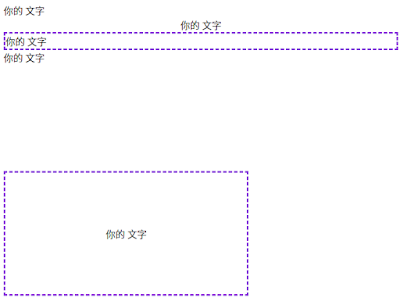
就如同下圖所表示的兩個SVG上有水平的字和垂直的字,以下將針對React.js和HTML內嵌SVG的作法。

小程式:用Imgur的Client ID上傳圖檔

圖片
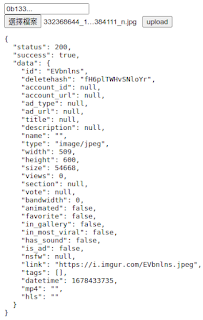
Imgur可以使用Client ID就上傳圖檔,官方上傳圖片的文件說明在 這裡 ,這裡分享簡易的圖片上傳頁,上傳Imgur後得到的圖片網址就在回應的data.link中。 那該如何取得你的Client ID? 

解決:本機網頁(http)無法連結到Imgur的問題

這是一個發生在VSCode寫一些小東西用http preview server開寫簡單功能測試時發生的問題。 你若直接用chrome開啟本機檔案點Imgur連結是沒有事情的, 妙的就是用http本機伺服器會變成403,直接跳轉過去imgur也是403。

html5開檔與預覽圖片

 這裡簡短分享一下html5開圖檔並預覽的功能

lastChild和lastElementChild的差異

這是寫寫HTML的小東西遇到的問題,也讓我終於看到lastChild和lastElementChild這兩者之間的差異,下面分享一下這個遭遇

筆記:HTML5 canvas畫圖

  畫線 const ctx = canvasEle . getContext ( " 2d " ); ctx . strokeStyle = color; ctx . lineWidth = width; ctx . beginPath (); ctx . moveTo (x, y); ctx . lineTo (x1, y1); ctx . stroke (); ctx . closePath (); 畫矩形 const ctx = canvasEle . getContext ( " 2d " ); ctx . strokeStyle = color; ctx . lineWidth = width; ctx . strokeRect (x, y, w, h); 畫橢圓 const ctx = canvasEle . getContext ( " 2d " ); ctx . strokeStyle = color; ctx . lineWidth = width; ctx . beginPath (); const wrad = w / 2.0 , hrad = h / 2.0 ; ctx . ellipse (x + wrad, y + hrad, wrad, hrad, rotate, 0 , 2 * Math.PI); ctx . stroke (); ctx . closePath (); 畫字 參考:  https://stackoverflow.com/questions/14836350/ const ctx = canvasEle . getContext ( " 2d " ); ctx . font = ` ${ fontStyle } ${ size } px ${ fontFace } ` ; const metrics = ctx . measureText (text); ctx . fillStyle = color; // 讓文字位...
使用form.submit()不會觸發form的onsubmit事件

使用form.submit()沒有觸發form的onsubmit事件處理

使用jQuery unblock UI搭建自訂的訊息視窗

這裡分享使用jQuery unblock UI搭建簡易訊息視窗。 1. 排版設定了id為err_box與id為msg_box這兩個div,用來讓unblock顯示訊息用的。 2. 引用unblock ui跟jquery 3. ublk是隱藏顯示的block ui;blk是開啟一個預設顯示'loading'的block ui。 4. err_msg和msg_box就是方便函數,給定訊息就會顯示錯誤視窗或是訊息視窗 < div id = "err_box" style = " display:none;cursor:default;background-color:red " > < h1 class = "m" ></ h1 > < button class = "y" > 確認 </ button > </ div > < div id = "msg_box" style = " display:none;cursor:default " > < h1 class = "m" ></ h1 > < button class = "y" > 確認 </ button > </ div > <script type="text/javascript" src="https://code.jquery.com/jquery-3.5.1.min.js"></script> <script type="text/javascript" src='https://cdnjs.cloudflare.com/ajax/libs/jquery.blockUI/2.70/jquery.blockUI.min.js'></script> <script> function ublk () { ...

CSS指定有跨欄的表格標題文字垂直置中

圖片
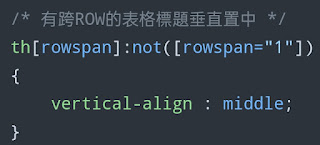
  標題列就是用vertical-align: middle來垂直置中, 以CSS來指定

HTML以Javascript處理表單

  寫法1.把js處理函數名稱寫在html中 缺點, 如果你的框架是template view分離就會很難控制 < form onsubmit = " submitHandler ( event ); " > < label for = "normal_text" > 一般文字欄位 </ label > < input id = " normal_text " type = "text" name = "my-text" value = "12345" /> < button type = "submit" > 傳送 </ button > </ form > < script > function submitHandler ( e ){ console . log ( '收到的事件' , e ); e . preventDefault (); //避免HTML的預設傳送行為發生 console . log ( '傳送表單的處理往下寫' ); } </ script > 寫法2.給定id 缺點 id 需要寫死,處理函數無法直接套用在不同的html網頁中(你如果id都寫一樣當然沒問題) < form id = "my-form" > < label for = "normal_text" > 一般文字欄位 </ label > < input id = "normal_text" type = "text" name = "my-text" value = "12345" /> < button type = "submit" > 傳送 </ button > </ for...

網頁上按一下複製文字到剪貼簿(附小雷點)

最近遇到需求想要在網頁上加入按一下複製內容到剪貼簿的功能,中間還不小心遇到小雷點分享一下。 我建構一個簡單的文字input放置要給使用者拷貝的資料,以及一個按鈕讓使用者點選複製到剪貼簿

HTML5:拖曳圖片到網頁預覽

圖片
這篇示範一個實體拖曳圖片檔案顯示在網頁上。 使用上一篇: HTML5: div內文字置中與多class結果展示 ,設定一個拖曳區域。加入drop事件,使用dataTransfer取得拖曳的檔案路徑。再設定img標籤的src完成顯示圖片的功能

HTML5: div內文字置中與多class結果展示

圖片
因為寫了使用bootstrap的網站在排版上真的是很有威力,不過拿掉之後就對HTML5本身都不太熟了。這裡紀錄一下,現代瀏覽器可以只用css排版,這裡展示一下多個class一起指定div的屬性。